Ajax Updates |
| Posted: 15 Aug 2009 12:02 PM PDT In HTML, if you don't specify a specific width, block-level elements are vertically expandable by their nature. Think of an unordered list. That list will grow be be as big as it needs to be to fit all of it's list elements. If a user increases the font size in their browser, the list will expand vertically, growing to fit the larger content. Sometimes it feels like vertical-only expansion is limiting and it would be nice if the element could grow horizontally as well as vertically with a font size increase by the user. Abstract If you have been using the Firefox 3 beta much, you might notice that it handles this automatically. Increasing the size in Firefox 3 doesn't just increase the font size, it increases everything in size, which actually feel really natural and nice. But despite it's growing market share, we can't count on Firefox for the resizing needs of our users. I am going to attempt to explain how to make an All-Expandable box, with the following features: * Works in all major browsers * Expands both vertically and horizontally * Uses a single background image 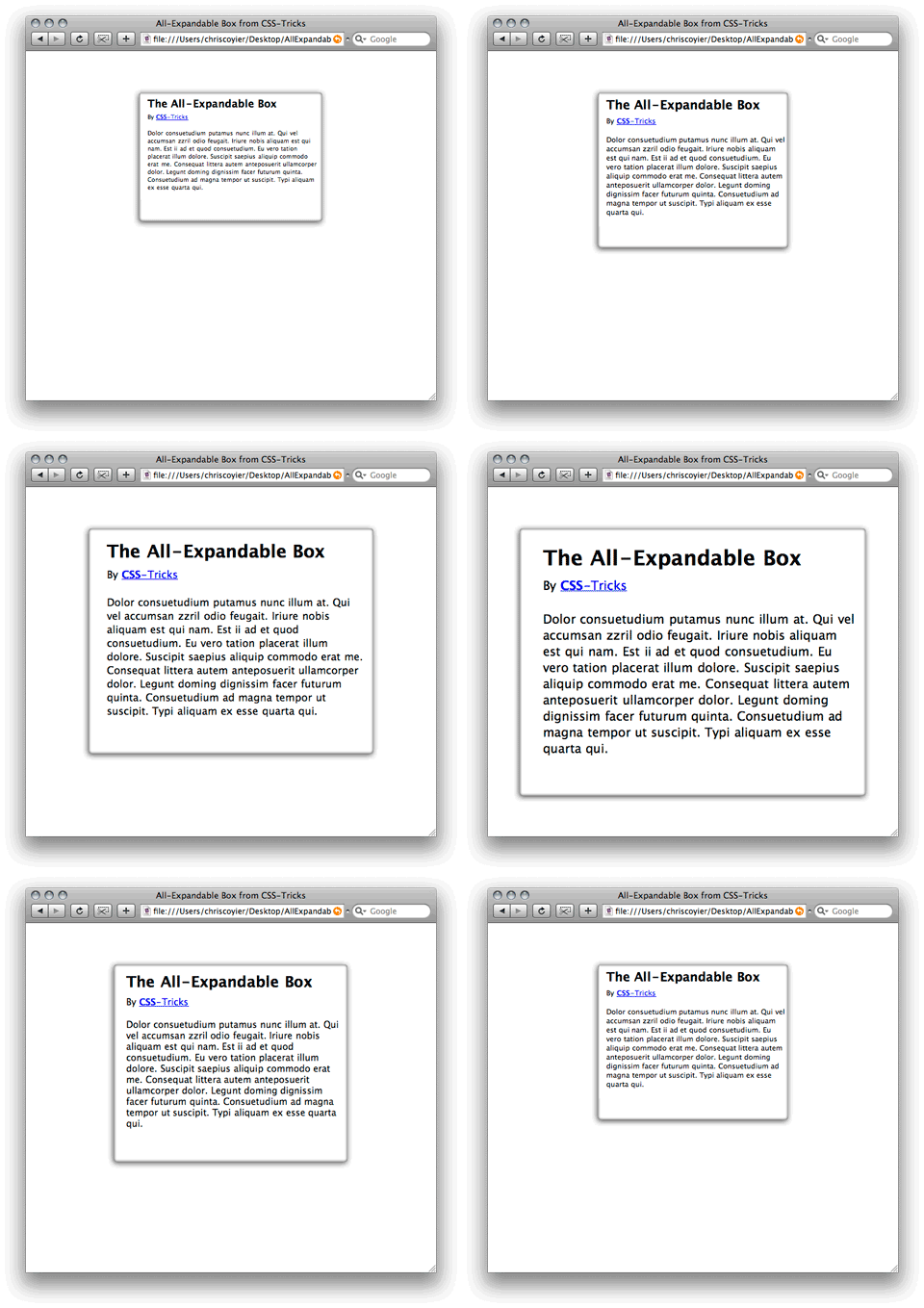 This is a bit of a tall order, especially the use of the background image. This will end up using kind of a combination of the CSS sprites technique since different areas of the image will be used in different places and the Sliding Doors technique, since different amounts of those images will be visible depending on the current size. Make the box horizontally expandable There is one way simple way to make a box horizontally expandable: specify your width in em's. For example:
The margin is there for example purposes, to keep it centered and away from the top edge of the browser window. Thinking about image placement In this example, the box has rounded corners, a bit of a drop shadow, and a bit of an inner shadow. This means that all of the four corners of the box are distinctly different. This is uniquely challenging since images are not expandable. We will need a way to apply the four different corner images to the four corners of the box separately. Also, we will need to overlap them in such a way that the transitions are seamless. And also, we are trying to do this with only a single background image, to make it as efficient as possible. Below is an image of how you might think of what we need to do. The boxes would be overlapping, I nudged them apart so you can see the whole boxes.  When creating the background image, think big. The bigger your background image, the larger you will be able to expand without borking the layout. The example background is 700px wide which gets you about 4 or 5 different text sizings it works at, but it does eventually break apart above that. Coding the box Of course we always like to be as semantic as possible with our XTHML. That means not using extra markup for things that aren't really content but are purely design. Unfortunately, with all this craziness of needing four boxes for our single box, it ain't gonna happen. This is how it's done:
Styling the box Here is the CSS for the four areas within the box:
This has been tested in Firefox, Safari, Opera, and IE 6 and is working in all of them, so I'm fairly satisfed it's a solid technique. Demo: http://www.webdesignerwall.com/demo/expandable-box/ Download: http://www.webdesignerwall.com/file/expandable-box-demo.zip Source: http://www.webdesignerwall.com/tutorials/css-the-all-expandable-box/  Related Listings:
| |||||||||||||||||||||||||||||||||||||||||||||||||||||||||||||||||||||||||||||||||||||||||||||||||||||||||||||||||
| Posted: 15 Aug 2009 11:41 AM PDT dsHistory is a small, cross-browser JavaScript library that can be used in web applications to handle the browser’s back and forward button events. As the back and forward events are raised, functions that the developer had previously pushed onto the internal function stack within the library are executed. Take a look at the demo. I encourage you to check out what makes it different from other browser history managers. Is It Stable? dsHistory is currently in beta and has not yet reached version 1.0. The first release occurred in April of 2007. That said, the code is functioning in production without problems on a number of different sites. It should be noted that, in the case of all browser history managers, the term “stable” is used loosely. Browser history managers are based on a number of different oddities (euphemism for hacks) in each browser. Even though dsHistory only supports four different browsers, the number of complexities are already very high, and thus even the most basic functionality takes a great deal of effort to achieve. Increased complexity is always directly proportional to increased failure. Where (Else) Can I Get Help? If you’ve already ready the Usage wiki and you’ve taken a look at the Examples wiki, you can post in the dsHistory-discuss Google Group. If you still can’t figure it out, I’m more than happy to help where and when I can. You can email me at amattie-attt-gmail-dottt-com. Getting Updates I’ll be posting information about major releases on my blog. I’ll post new downloads and other project-specific updates on the dsHistory Project Updates blog. Otherwise, you can check back here for updates. Current Browser Support * Firefox 2, 3 : Yes * Internet Explorer 6, 7 : Yes * Safari 2 : No * Safari 3 : Yes * Google Chrome : Yes * Opera : No Demo: http://dshistory.googlecode.com/svn/trunk/examples/demo.html Download: http://dshistory.googlecode.com/files/dshistory-v1-beta5.zip Source: http://code.google.com/p/dshistory/ Related Listings:
| |||||||||||||||||||||||||||||||||||||||||||||||||||||||||||||||||||||||||||||||||||||||||||||||||||||||||||||||||
| Posted: 15 Aug 2009 11:15 AM PDT Use the same ubiquitous set of languages you find in the Web browser, on the server to build full apps or presentation tiers faster and more easily. Jaxer is licensed under the GPL, and leverages the ubiquitous Mozilla engine that is used in Firefox 3, which means that Jaxer is fully compatible with the latest JavaScript standards, including access to all of the features you are familiar with – from Date to Math to window and document, and even JavaScript 1.5, 1.7, and 1.8 – they’re all there. If you know JavaScript and HTML, you can already build Jaxer applications. Database, file, and socket access from JavaScriptWith Jaxer, your JavaScript gains full access to databases such as MySQL or the integrated SQLite database. Rich filesystem I/O as well as low-level network socket access are available to you all directly in JavaScript on the server. And you can call those server functions seamlessly from the client – exposing only the ones consistent with your security requirements. Share validation code on the browser and serverWith Jaxer, you can also tag any function or block of functions to run on both the server and the browser. Developers can write logic once, and it can be executed from either location. One ideal use of this is data validation. Validate your forms on the client to provide instant user feedback, and once the form is successfully submitted, validate it again on the server to ensure its integrity, using the exact same logic – no more code rewriting, and no getting them out of sync and possibly opening security holes. Easily create RESTful JSON data servicesNot surprisingly, JSON is native to Jaxer, so creating RESTful JSON services to provide data to Ajax, Adobe Flash, Adobe Flex and even Microsoft Silverlight clients is dead easy. Directly call server-side functions from the browserNo need to write cumbersome XML HTTP requests with Jaxer (though you can!). Instead you can “proxy” your scripts by setting “runat=server-proxy”. Then you call the function in the HTML page just as you would any other client-side function but Jaxer executes it on the server and returns the result to the client. All of the data marshaling and communications are handled transparently for you. And to enable asynchronous communications, just prepend “Async” to the function name and specify a callback function. Full DOM and JavaScript on the serverBecause Jaxer is a full Ajax server, you can not only run JavaScript on the server using the same techniques you’ve mastered in the browser, but you can also manipulate the DOM in the APIs you already use. Use your favorite Ajax libraries server-sideRun jQuery, dojo, Ext JS, prototype, scriptaculous and other Ajax libraries on Jaxer to manipulate the HTML page and DOM before the page gets sent to the browser and those libraries can be used again. Customize content or forms server-side based on user profiles, optimize app performance by aggregating external scripts, CSS, and even images into single HTTP requests, generate pages optimized for devices that do not support Ajax, or flatten pages for search engine optimizations. Manipulate, mashup and morph any existing HTML pageConsume and transform content from HTML pages written in other languages like PHP, Python, Ruby on Rails, .NET or Java. Jaxer includes a rich framework for many useful tasks on the server, including accessing local or remote web resources and services without cross-domain security restrictions that a browser might impose, or rewriting HTML pages generated by other platforms.A Browser’s Engine Running on the ServerJaxer’s core engine is based on the same Mozilla engine that you’ll find in the popular Mozilla Firefox browser. This means that the execution environment you use on both the client and the server are the same. It’s Ajax all the way through and through. That means you only need one set of languages — the languages that are native to the browser — to create entire applications. Lifecycle of a HTML page with Jaxer
A whole app in a HTML page?By default Jaxer processes .html files on the server before sending them on to the server. You can configure Jaxer to process other files extensions as well, or even set Jaxer up to provide RESTful JSON services to other apps — even non-Ajax apps. This means that you could create a whole app in a single HTML page if you wanted, though multiple files is still the best practice for more extensive applications and team development processes.Jaxer performs in the range of PHP and Ruby on RailsJaxer 1.0 is ready for full-scale application deployments and while our plans are to continue to boost performance with each release, initial studies show that Jaxer performs in the range of the widely used PHP and Ruby on Rails application platforms. Related Listings:
|
| You are subscribed to email updates from Ajax Updates To stop receiving these emails, you may unsubscribe now. | Email delivery powered by Google |
Inbox too full?  | |
| Google Inc., 20 West Kinzie, Chicago IL USA 60610 | |


0 comments:
Post a Comment
Note: Only a member of this blog may post a comment.