Ajax Updates |
- ShadowBox Light Box using Javascript
- CSS Gradient Effect
- CSS Text Gradients – Quick Stylish Headings
| ShadowBox Light Box using Javascript Posted: 16 Aug 2009 11:20 AM PDT Shadowbox is an online media viewer application that supports all of the web’s most popular media publishing formats. Shadowbox is written entirely in JavaScript and CSS and is highly customizable. Using Shadowbox, website authors can showcase a wide assortment of media in all major browsers without navigating users away from the linking page. Features What sets Shadowbox apart from every other “box” out there? Standards Shadowbox uses HTML markup that validates. It doesn’t depend on phony HTML attributes in your anchor tags to make it work. The web has enough problems with standards compliance as it is, and Shadowbox does its best to not perpetuate them. Free from Frameworks Although Shadowbox has the unique ability to adapt to whatever JavaScript framework you choose, it’s just as easy to run it as a standalone application, giving the developer a great deal of flexibility. Flexible Shadowbox supports all of the web’s most popular media publishing formats including images, QuickTime, Windows Media Player, Flash, Flash video, HTML, and even external web pages. This makes it easy to display your content, no matter what it is. Smart Shadowbox uses a smart plugin detection mechanism behind the scenes that can spare your users from confusing torn image or puzzle piece icons when they don’t have the plugins they need to view your content. Also, it will never overflow the viewport, forcing those obnoxious scroll bars. Customizable Shadowbox supports a host of options that make it highly configurable. If you don’t like the way something works, chances are very good that you can change it without digging through the code. Universal Shadowbox ships with support for many of the world’s most-spoken languages, and it’s not difficult to configure Shadowbox to communicate with your visitors in their native tongue. Neat and Compact The Shadowbox code is neat and modular. And it’s smart enough to only include the code you need to run your application so it’s as light weight as possible. Demo: http://www.shadowbox-js.com/ Download: http://www.shadowbox-js.com/download.php?compress=build&format=zip&x=108&y=27 http://www.shadowbox-js.com/download.html Source: http://www.shadowbox-js.com/  Related Listings:
| |||||||||||||||||||||||||||||||||||||||||||||||||||||||||||||||||||||||||||||||||||||||||||||
| Posted: 16 Aug 2009 11:00 AM PDT Do you want to create fancy headings without rendering each heading with Photoshop? Here is a simple CSS trick to show you how to create gradient text effect with a PNG image (pure CSS, no Javascript or Flash). All you need is an empty “span” tag in the heading and apply the background image overlay using the CSS position:absolute property. This trick has been tested on most browsers: Firefox, Safari, Opera, and even Internet Explorer 6. Continue to read this article to find out how. Benefits * This is pure CSS trick, no Javascript or Flash. It works on most browsers including IE6 (PNG hack required). * It is perfect for designing headings. You don't have to render each heading with Photoshop. This will save you time and bandwidth. * You can use on any web fonts and the font size remains scalable. How does this work? The trick is very simple. Basically we are just adding a 1px gradient PNG (with alpha transparency) over the text. 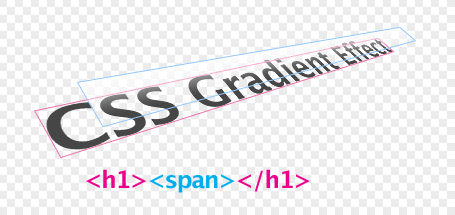 The HTML markups
CSS Gradient Text The key point here is: h1 { position: relative } and h1 span { position: absolute }
Make it work on IE6 Since IE6 doesn't render PNG-24 properly, the following hack is required in order to display the transparent PNG (add anywhere in between the tag):
< ![endif]--> Demo: http://www.webdesignerwall.com/demo/css-gradient-text/ Download: http://www.webdesignerwall.com/file/css-gradient-demo.zip Source: http://www.webdesignerwall.com/tutorials/css-gradient-text-effect/ Related Listings:
| |||||||||||||||||||||||||||||||||||||||||||||||||||||||||||||||||||||||||||||||||||||||||||||
| CSS Text Gradients – Quick Stylish Headings Posted: 16 Aug 2009 10:37 AM PDT Text Gradient is a simple css trick that allows you to improve your site’s appearance by putting gradients on system font titles using nothing but css and a png image. The trick is very simple. Text Grannt in png should start with your background color (in this case we use white gradient). First the html set up. Each title (preferably heading tag) uses additional empty nested span element. The code looks like this: My Cool TitleUse the css to define styiling of the H2. You really don/t have to follow the styling in this example. Use your own. The only important thing is to make sure that you set position property to relative;.
Now the gradient. We put a transparent png as a background image for the span element and set position property to absolute so it can go above the text.
Unfortunately, we don't live in a perfect world and not all browsers support png transparency. So for those browsers, please include this as well.
So, the empty span goes above the title and it is stretched accross entire width and height. Since the gradient includes title's background color it will not be visible in the gaps between the letters, making the effect real. Demo: http://cssglobe.com/lab/textgradient Download: http://cssglobe.com/lab/textgradient/textgradient.zip Source: http://cssglobe.com/lab/textgradient Related Listings:
|
| You are subscribed to email updates from Ajax Updates To stop receiving these emails, you may unsubscribe now. | Email delivery powered by Google |
Inbox too full?  | |
| Google Inc., 20 West Kinzie, Chicago IL USA 60610 | |


0 comments:
Post a Comment
Note: Only a member of this blog may post a comment.