Ajax Updates |

- Jquery Accordion Menu
- Collasible Draggable Panels
- Slide Puzzle using Mootools
- MooMessageBox – Image Box for Lighbox
| Posted: 08 Dec 2009 09:46 AM PST A jQuery powered accordion content script. Group contents together and reveal them on demand when the user clicks on headers. Specify whether only one content within the group should be open at any given time, style the headers depending on their content state, and enable persistence so the state of the contents is preserved within a browser session. A dedicated page showing how to easily create an Accordion Menu using the script (see demo link) is also available. 1. ddaccordion.js Entire HTML Source code: < !DOCTYPE html PUBLIC "-//W3C//DTD XHTML 1.0 Strict//EN" "http://www.w3.org/TR/xhtml2/DTD/xhtml1-strict.dtd"> <html xmlns="http://www.w3.org/1999/xhtml" xml:lang="en"> <head> <script type="text/javascript" src="http://ajax.googleapis.com/ajax/libs/jquery/1.3.2/jquery.min.js"></script> <script type="text/javascript" src="ddaccordion.js"> /*********************************************** * Accordion Content script- (c) Dynamic Drive DHTML code library (www.dynamicdrive.com) * Visit http://www.dynamicDrive.com for hundreds of DHTML scripts * This notice must stay intact for legal use ***********************************************/ </script> <script type="text/javascript"> ddaccordion.init({ headerclass: "submenuheader", //Shared CSS class name of headers group contentclass: "submenu", //Shared CSS class name of contents group revealtype: "click", //Reveal content when user clicks or onmouseover the header? Valid value: "click", "clickgo", or "mouseover" mouseoverdelay: 200, //if revealtype="mouseover", set delay in milliseconds before header expands onMouseover collapseprev: true, //Collapse previous content (so only one open at any time)? true/false defaultexpanded: [], //index of content(s) open by default [index1, index2, etc] [] denotes no content onemustopen: false, //Specify whether at least one header should be open always (so never all headers closed) animatedefault: false, //Should contents open by default be animated into view? persiststate: true, //persist state of opened contents within browser session? toggleclass: ["", ""], //Two CSS classes to be applied to the header when it's collapsed and expanded, respectively ["class1", "class2"] togglehtml: ["suffix", "<img src='plus.gif' class='statusicon' />", "<img src='minus.gif' class='statusicon' />"], //Additional HTML added to the header when it's collapsed and expanded, respectively ["position", "html1", "html2"] (see docs) animatespeed: "fast", //speed of animation: integer in milliseconds (ie: 200), or keywords "fast", "normal", or "slow" oninit:function(headers, expandedindices){ //custom code to run when headers have initalized //do nothing }, onopenclose:function(header, index, state, isuseractivated){ //custom code to run whenever a header is opened or closed //do nothing } }) </script> <style type="text/css"> .glossymenu{ margin: 5px 0; padding: 0; width: 170px; /*width of menu*/ border: 1px solid #9A9A9A; border-bottom-width: 0; } .glossymenu a.menuitem{ background: black url(glossyback.gif) repeat-x bottom left; font: bold 14px "Lucida Grande", "Trebuchet MS", Verdana, Helvetica, sans-serif; color: white; display: block; position: relative; /*To help in the anchoring of the ".statusicon" icon image*/ width: auto; padding: 4px 0; padding-left: 10px; text-decoration: none; } .glossymenu a.menuitem:visited, .glossymenu .menuitem:active{ color: white; } .glossymenu a.menuitem .statusicon{ /*CSS for icon image that gets dynamically added to headers*/ position: absolute; top: 5px; right: 5px; border: none; } .glossymenu a.menuitem:hover{ background-image: url(glossyback2.gif); } .glossymenu div.submenu{ /*DIV that contains each sub menu*/ background: white; } .glossymenu div.submenu ul{ /*UL of each sub menu*/ list-style-type: none; margin: 0; padding: 0; } .glossymenu div.submenu ul li{ border-bottom: 1px solid blue; } .glossymenu div.submenu ul li a{ display: block; font: normal 13px "Lucida Grande", "Trebuchet MS", Verdana, Helvetica, sans-serif; color: black; text-decoration: none; padding: 2px 0; padding-left: 10px; } .glossymenu div.submenu ul li a:hover{ background: #DFDCCB; colorz: white; } </style> </head> <body> <div class="glossymenu"> <a class="menuitem" href="http://www.dynamicdrive.com/">Dynamic Drive</a> <a class="menuitem submenuheader" href="http://www.dynamicdrive.com/style/" >CSS Examples</a> <div class="submenu"> <ul> <li><a href="http://www.dynamicdrive.com/style/csslibrary/category/C1/">Horizontal CSS Menus</a></li> <li><a href="http://www.dynamicdrive.com/style/csslibrary/category/C2/">Vertical CSS Menus</a></li> <li><a href="http://www.dynamicdrive.com/style/csslibrary/category/C4/">Image CSS</a></li> <li><a href="http://www.dynamicdrive.com/style/csslibrary/category/C6/">Form CSS</a></li> <li><a href="http://www.dynamicdrive.com/style/csslibrary/category/C5/">DIVs and containers</a></li> <li><a href="http://www.dynamicdrive.com/style/csslibrary/category/C7/">Links & Buttons</a></li> <li><a href="http://www.dynamicdrive.com/style/csslibrary/category/C8/">Other</a></li> <li><a href="http://www.dynamicdrive.com/style/csslibrary/all/">Browse All</a></li> </ul> </div> <a class="menuitem" href="http://www.javascriptkit.com/jsref/">JavaScript Reference</a> <a class="menuitem" href="http://www.javascriptkit.com/domref/">DOM Reference</a> <a class="menuitem submenuheader" href="http://www.cssdrive.com">CSS Drive</a> <div class="submenu"> <ul> <li><a href="http://www.cssdrive.com">CSS Gallery</a></li> <li><a href="http://www.cssdrive.com/index.php/menudesigns/">Menu Gallery</a></li> <li><a href="http://www.cssdrive.com/index.php/news/">Web Design News</a></li> <li><a href="http://www.cssdrive.com/index.php/examples/">CSS Examples</a></li> <li><a href="http://www.cssdrive.com/index.php/main/csscompressor/">CSS Compressor</a></li> <li><a href="http://www.dynamicdrive.com/forums/forumdisplay.php?f=6">CSS Forums</a></li> </ul> <img src="http://i27.tinypic.com/sy7295.gif" style="margin: 10px 5px" /> </div> <a class="menuitem" href="http://www.codingforums.com/" style="border-bottom-width: 0">Coding Forums</a> </div> <p>Assuming the current page is named "current.htm", the below links when navigated to expands a particular header on that page:</p> <p> - <a href="current.htm?submenuheader=0">Expand 1st header within "submenuheader" header group</a><br /> </p> <p>Helpful links: </p> <p> - <a href="http://www.dynamicdrive.com/dynamicindex17/ddaccordion_suppliment.htm">Adding arbitrary links hat expand/ collapse the contents</a><br /> - <a href="http://www.dynamicdrive.com/dynamicindex17/ddaccordion_suppliment2.htm">Taking advantage of the oninit() and onopenclose() event handlers</a><br /> </p> </body> </html> The menu uses four images for the purpose of styling the menu (download by right clicking, and select “Save As”): See the frontpage of Accordion Content script for a full explanation of each setting inside the script. Same menu as above, except this one also uses the oninit() and onopenclose() event handlers to run custom code when the menu has finished loading, plus when a header is expanded/contracted due to user initiated action per the config.revealtype setting, respectively. See Taking advantage of the oninit() and onopenclose() event handlers for details. < !DOCTYPE html PUBLIC "-//W3C//DTD XHTML 1.0 Strict//EN" "http://www.w3.org/TR/xhtml2/DTD/xhtml1-strict.dtd"> <html xmlns="http://www.w3.org/1999/xhtml" xml:lang="en"> <head> <script type="text/javascript" src="http://ajax.googleapis.com/ajax/libs/jquery/1.3.2/jquery.min.js"></script> <script type="text/javascript" src="ddaccordion.js"> /*********************************************** * Accordion Content script- (c) Dynamic Drive DHTML code library (www.dynamicdrive.com) * Visit http://www.dynamicDrive.com for hundreds of DHTML scripts * This notice must stay intact for legal use ***********************************************/ </script> <script type="text/javascript"> ddaccordion.init({ headerclass: "submenuheader", //Shared CSS class name of headers group contentclass: "submenu", //Shared CSS class name of contents group revealtype: "click", //Reveal content when user clicks or onmouseover the header? Valid value: "click", "clickgo", or "mouseover" mouseoverdelay: 200, //if revealtype="mouseover", set delay in milliseconds before header expands onMouseover collapseprev: true, //Collapse previous content (so only one open at any time)? true/false defaultexpanded: [], //index of content(s) open by default [index1, index2, etc] [] denotes no content onemustopen: false, //Specify whether at least one header should be open always (so never all headers closed) animatedefault: false, //Should contents open by default be animated into view? persiststate: true, //persist state of opened contents within browser session? toggleclass: ["", ""], //Two CSS classes to be applied to the header when it's collapsed and expanded, respectively ["class1", "class2"] togglehtml: ["suffix", "<img src='plus.gif' class='statusicon' />", "<img src='minus.gif' class='statusicon' />"], //Additional HTML added to the header when it's collapsed and expanded, respectively ["position", "html1", "html2"] (see docs) animatespeed: "fast", //speed of animation: integer in milliseconds (ie: 200), or keywords "fast", "normal", or "slow" oninit:function(headers, expandedindices){ //custom code to run when headers have initalized myiframe=window.frames["myiframe"] if (expandedindices.length>0) //if there are 1 or more expanded headers myiframe.location.replace(headers[expandedindices.pop()].getAttribute('href')) //Get "href" attribute of final expanded header to load into IFRAME }, onopenclose:function(header, index, state, isuseractivated){ //custom code to run whenever a header is opened or closed if (state=="block" && isuseractivated==true){ //if header is expanded and as the result of the user initiated action myiframe.location.replace(header.getAttribute('href')) } } }) </script> <style type="text/css"> .glossymenu{ margin: 5px 0; padding: 0; width: 170px; /*width of menu*/ border: 1px solid #9A9A9A; border-bottom-width: 0; } .glossymenu a.menuitem{ background: black url(glossyback.gif) repeat-x bottom left; font: bold 14px "Lucida Grande", "Trebuchet MS", Verdana, Helvetica, sans-serif; color: white; display: block; position: relative; /*To help in the anchoring of the ".statusicon" icon image*/ width: auto; padding: 4px 0; padding-left: 10px; text-decoration: none; } .glossymenu a.menuitem:visited, .glossymenu .menuitem:active{ color: white; } .glossymenu a.menuitem .statusicon{ /*CSS for icon image that gets dynamically added to headers*/ position: absolute; top: 5px; right: 5px; border: none; } .glossymenu a.menuitem:hover{ background-image: url(glossyback2.gif); } .glossymenu div.submenu{ /*DIV that contains each sub menu*/ background: white; } .glossymenu div.submenu ul{ /*UL of each sub menu*/ list-style-type: none; margin: 0; padding: 0; } .glossymenu div.submenu ul li{ border-bottom: 1px solid blue; } .glossymenu div.submenu ul li a{ display: block; font: normal 13px "Lucida Grande", "Trebuchet MS", Verdana, Helvetica, sans-serif; color: black; text-decoration: none; padding: 2px 0; padding-left: 10px; } .glossymenu div.submenu ul li a:hover{ background: #DFDCCB; colorz: white; } </style> </head> <body> <div class="glossymenu"> <a class="menuitem" href="http://www.dynamicdrive.com/">Dynamic Drive</a> <a class="menuitem submenuheader" href="http://www.dynamicdrive.com/style/">CSS Examples</a> <div class="submenu"> <ul> <li><a href="http://www.dynamicdrive.com/style/csslibrary/category/C1/">Horizontal CSS Menus</a></li> <li><a href="http://www.dynamicdrive.com/style/csslibrary/category/C2/">Vertical CSS Menus</a></li> <li><a href="http://www.dynamicdrive.com/style/csslibrary/category/C4/">Image CSS</a></li> <li><a href="http://www.dynamicdrive.com/style/csslibrary/category/C6/">Form CSS</a></li> <li><a href="http://www.dynamicdrive.com/style/csslibrary/category/C5/">DIVs and containers</a></li> <li><a href="http://www.dynamicdrive.com/style/csslibrary/category/C7/">Links & Buttons</a></li> <li><a href="http://www.dynamicdrive.com/style/csslibrary/category/C8/">Other</a></li> <li><a href="http://www.dynamicdrive.com/style/csslibrary/all/">Browse All</a></li> </ul> </div> <a class="menuitem" href="http://www.javascriptkit.com/jsref/">JavaScript Reference</a> <a class="menuitem" href="http://www.javascriptkit.com/domref/">DOM Reference</a> <a class="menuitem submenuheader" href="http://www.cssdrive.com">CSS Drive</a> <div class="submenu"> <ul> <li><a href="http://www.cssdrive.com">CSS Gallery</a></li> <li><a href="http://www.cssdrive.com/index.php/menudesigns/">Menu Gallery</a></li> <li><a href="http://www.cssdrive.com/index.php/news/">Web Design News</a></li> <li><a href="http://www.cssdrive.com/index.php/examples/">CSS Examples</a></li> <li><a href="http://www.cssdrive.com/index.php/main/csscompressor/">CSS Compressor</a></li> <li><a href="http://www.dynamicdrive.com/forums/forumdisplay.php?f=6">CSS Forums</a></li> </ul> <img src="http://i27.tinypic.com/sy7295.gif" style="margin: 10px 5px" /> </div> <a class="menuitem" href="http://www.codingforums.com/" style="border-bottom-width: 0">Coding Forums</a> </div> <p><iframe name="myiframe" style="width: 90%; height: 300px; border:1px solid black"></iframe></p> <p>Assuming the current page is named "current.htm", the below links when navigated to expands a particular header on that page:</p> <p> - <a href="current.htm?submenuheader=0">Expand 1st header within "submenuheader" header group</a><br /> </p> <p>Helpful links: </p> <p> - <a href="http://www.dynamicdrive.com/dynamicindex17/ddaccordion_suppliment.htm">Adding arbitrary links hat expand/ collapse the contents</a><br /> - <a href="http://www.dynamicdrive.com/dynamicindex17/ddaccordion_suppliment2.htm">Taking advantage of the oninit() and onopenclose() event handlers</a><br /> </p> </body> </html> The menu uses four images for the purpose of styling the menu (download by right clicking, and select “Save As”):  Related Listings:
| |||||
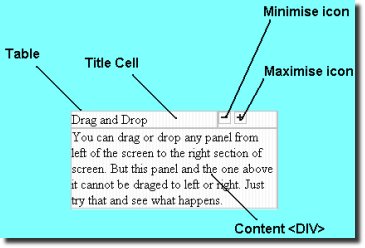
| Posted: 08 Dec 2009 09:28 AM PST Create a collapsible and draggable panels using javascript. Such UI elements are becoming very popular and are being used with AJAX to create awesome UI. There can be many ways of doing this. Here I will be using Dojo, which is a high quality open source javascript toolkit. The main advantage is multiple browser support and the easy to use features it offers. Introduction The Collapsible panel <table id="w1" cellspacing=0><tr class="TRtitle"> <td class="TDtitle">Dojo</td><td class="tdicons"> <img onclick="wipeOut('l1')" alt=- src="images/minus.gif"/> <img onclick="wipeIn('l1')" src="images/plus.gif" /></td></tr> <tr><td colspan=2> <div id="l1" class="DIVcontainer"> <div class="DIVinner"> Dojo is a cool javascript library.You can find more on DOJO here.This example uses drag&drop and animations from Dojo </div> </div> </td></tr> </table> On the ‘click’ events of the(-/+) images, we call ‘wipeIn’ and ‘wipeOut’ respectively.I have added an extra line in these functions, so that wipeIn and wipeOut action only happens, when it is meant to be. I mean an already hidden panel, need not be wiped in and a visible panel , need not be wipedOut. Here, I needed to add the following line to get the code working in FireFox. In IE the line ‘dojo.style.getStyle(elId,”height”)’ returns 'auto' while in FireFox it returns the actual height (eg 100px). function wipeOut(elId){ if(dojo.style.getStyle(elId,"height")!='auto' && dojo.style.getStyle(elId,"height")!='100px' )return; dojo.fx.wipeOut(dojo.byId(elId), 300);} function wipeIn(elId) { if(dojo.style.getStyle(elId,"height")!='0px')return; dojo.fx.wipeIn(dojo.byId(elId), 300);} Drag and Drop function init(){ new dojo.dnd.HtmlDragSource("w1", "left"); new dojo.dnd.HtmlDragSource("w2", "left"); new dojo.dnd.HtmlDragSource("w3", "left"); new dojo.dnd.HtmlDragSource("w4", "right"); new dojo.dnd.HtmlDragSource("w5", "right"); new dojo.dnd.HtmlDragSource("w6", "right"); new dojo.dnd.HtmlDragSource("w7", "center"); new dojo.dnd.HtmlDragSource("w8", "center"); new dojo.dnd.HtmlDropTarget("leftdiv", ["left","right"]); new dojo.dnd.HtmlDropTarget("rightdiv",["left","right"]); new dojo.dnd.HtmlDropTarget("centerdiv",["center"]); } Here, 'left','right' and 'center' represent a 'type' of source. While declaring a target, you can pass an array of typenames , indicating that this target can accept following types of sources. For example, the target 'leftdiv' can accept any source of 'left' or 'right' type. This is all we do to implement drag and drop. Finally we 'connect' the init() function to the 'loaded' event , so that it executes only after the whole document has been loaded. dojo.event.connect(dojo, "loaded", "init"); Finally Related Listings:
| |||||
| Posted: 08 Dec 2009 09:15 AM PST So I finally decided to try out one of these JavaScript libraries … and what better way than to create a Slide puzzle. I chose mootools because of there modular download … it's pretty slick. My goal was to make it simple for users: - include the source file //ADD SCRIPT TAGS <script src="j/mootools.v1.00.js" type="text/javascript"> </script> <script src="j/puzzle.js" type="text/javascript"> </script> //ADD DIV ID PUZZLE WITH IMG <div id="puzzle"> <img src="abc.jpg" alt="" width="5" height="5" /> </div> //CALL FUNCTIONS functions //makes 3x3 Puzzle.make(3); //shuffles puzzle Puzzle.shuffle(); //fixes puzzle Puzzle.fix() ; //switch image Puzzle.switch_image('xyz.jpg') Related Listings:
| |||||
| MooMessageBox – Image Box for Lighbox Posted: 08 Dec 2009 09:08 AM PST If you want to display a customized image box like a lightbox and not a real message box from your system, then use this simple to integrate message box class for mootools. You can define serveral parameters from bg-color, background imge, rounded corners ( if wanted ), amount of buttons, button text, width and height, show delay time etc. The box can even hold html code and / or images. Compatibility: This box has been tested with Internet Explorer 6/7, Firefox 2.0.0.14, Opera 9.2 and Apple Safari for Windows. Basic Steps Usage: Copy moomessagebox12.js ( or equivalent for 1.1 version ) to your js folder in your website root. Now copy all images into your root document or change the links inside the moomessagebox12.js file. Copy the ajax.js to your js folder ( mootools framework ). Open the page you want mooMessageBox to be used on. Now add these lines to the head section of your site: <head> <script language="javascript" type="text/ecmascript" src="js/ajax.js"></script> <script language="javascript" type="text/ecmascript" src="js/moomessagebox12.js"></script> </head> Now add a DIV that holds the contents you wish to display inside the messagebox into your document, i.e. like this: <div id="myDiv"> <h3>Messagebox with mootools</h3> <p>This is a messagebox - add content to it. Images, HTML or whatever comes to your mind</p> </div> Right before the closing tag, add the follwing line: var p = new mooSimpleBox ({ width :430, height :350, closeBtn :'myBtn', btnTitle : 'close', boxClass :'myBox', cid :'myID', fadeSpeed :500, opacity :'0.9', addContentID :'myDiv', boxTitle :'artViper messageBox', isDrag :'true'}); To make the box work you’ll need to add some functionality to the links that fire the events to show the box. Add a link to your page and apply the ID ’showBox’. $('showBox').addEvent('click',function(e){ e = new Event(e).stop(); p.fadeIn(); }) Variables: 1. new mooSimpleBox({ options }); – create a new box Related Listings:
|

| You are subscribed to email updates from Ajax Updates To stop receiving these emails, you may unsubscribe now. | Email delivery powered by Google |
| Google Inc., 20 West Kinzie, Chicago IL USA 60610 | |


0 comments:
Post a Comment
Note: Only a member of this blog may post a comment.