Ajax Updates |

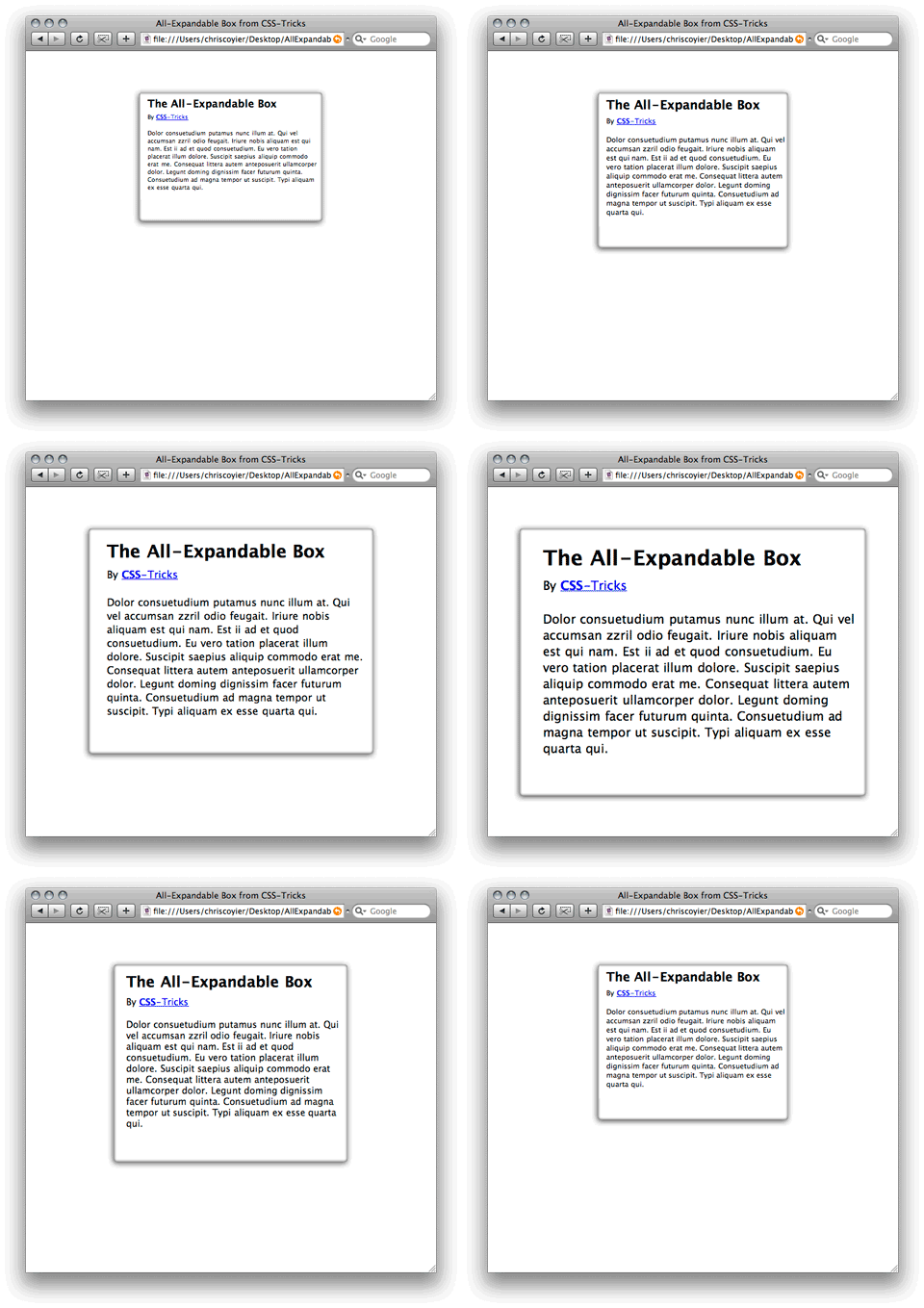
| Posted: 14 Dec 2009 12:45 PM PST In HTML, if you don't specify a specific width, block-level elements are vertically expandable by their nature. Think of an unordered list. That list will grow be be as big as it needs to be to fit all of it's list elements. If a user increases the font size in their browser, the list will expand vertically, growing to fit the larger content. Sometimes it feels like vertical-only expansion is limiting and it would be nice if the element could grow horizontally as well as vertically with a font size increase by the user. Abstract If you have been using the Firefox 3 beta much, you might notice that it handles this automatically. Increasing the size in Firefox 3 doesn't just increase the font size, it increases everything in size, which actually feel really natural and nice. But despite it's growing market share, we can't count on Firefox for the resizing needs of our users. I am going to attempt to explain how to make an All-Expandable box, with the following features: * Works in all major browsers This is a bit of a tall order, especially the use of the background image. This will end up using kind of a combination of the CSS sprites technique since different areas of the image will be used in different places and the Sliding Doors technique, since different amounts of those images will be visible depending on the current size. There is one way simple way to make a box horizontally expandable: specify your width in em's. For example: .box { width: 35em; margin: 50px auto; } The margin is there for example purposes, to keep it centered and away from the top edge of the browser window. In this example, the box has rounded corners, a bit of a drop shadow, and a bit of an inner shadow. This means that all of the four corners of the box are distinctly different. This is uniquely challenging since images are not expandable. We will need a way to apply the four different corner images to the four corners of the box separately. Also, we will need to overlap them in such a way that the transitions are seamless. And also, we are trying to do this with only a single background image, to make it as efficient as possible. Below is an image of how you might think of what we need to do. The boxes would be overlapping, I nudged them apart so you can see the whole boxes. Of course we always like to be as semantic as possible with our XTHML. That means not using extra markup for things that aren't really content but are purely design. Unfortunately, with all this craziness of needing four boxes for our single box, it ain't gonna happen. This is how it's done: <div class="box"> <div class="topleft"> <div class="topright"> <div> CONTENT GOES HERE </div> </div> </div> <div class="bottomleft"> <div class="bottomright"> </div> </div> </div> Styling the box Here is the CSS for the four areas within the box: .box div.topleft { display: block; background: url("images/box-bg.png") top left no-repeat white; padding: 2.0em 0em 0em 2.0em; } .box div.topright { display: block; background: url("images/box-bg.png") top right no-repeat white; padding: 2.0em; margin: -2.0em 0 0 2.0em; } .box div.bottomleft { display: block; height: 45px; margin-top: -2.0em; background: url("images/box-bg.png") bottom left no-repeat white; } .box div.bottomright { display: block; background: url("images/box-bg.png") bottom right no-repeat white; height: 45px; margin-left: 3.0em; } Note the negative margins are necessary to pull back from the padding applied from the parent spans. It just works out good that way with the padding, keeping text inside the box. Also note the height of the bottom spans are set in pixels. That is on purpose as they need to be kept short and not be expandable. This has been tested in Firefox, Safari, Opera, and IE 6 and is working in all of them, so I'm fairly satisfed it's a solid technique.  Related Listings:
| |||||
| Posted: 14 Dec 2009 12:34 PM PST jGrowl is a jQuery plugin that raises unobtrusive messages within the browser, similar to the way that OS X’s Growl Framework works. Example Usage and Samples: // Sample 1 $.jGrowl("Hello world!"); // Sample 2 $.jGrowl("Stick this!", { sticky: true }); // Sample 3 $.jGrowl("A message with a header", { header: 'Important' }); // Sample 4 $.jGrowl("A message that will live a little longer.", { life: 10000 }); // Sample 5 $.jGrowl("A message with a beforeOpen callback and a different opening animation.", { beforeClose: function(e,m) { alert('About to close this notification!'); }, animateOpen: { height: 'show' } }); Included in the download package is a more extensive set of examples for jGrowl usage. Support jGrowl: jGrowl is free and open source, it’s distributed under the MIT and GPL licenses – which means you can pretty much do whatever you want with it. Are you a Drupal user? Check out the Drupal module for jGrowl. Also check out the private-message module which uses jGrowl to deliver messages. Are you an iGoogle user? Betwittered a twitter client for your favorite search engine start page uses jGrowl. Check out a modification for webSPELL to use jGrowl here. Are you a WordPress user? LiveGets, a plugin to update any WordPress widget in real time uses jGrowl. Related Listings:
| |||||
| Posted: 14 Dec 2009 12:12 PM PST Tooltip let’s you create mouse over tooltips to your content and allows you to show additional information.It using Gzip loader technique that will deliver CSS and Javascript files more faster and also with minimun HTTP request.Need MooTools,PHP and a few js.The main code is from YOOtooltip. Display parameter:block or inline The display option is used to define wether the tooltip trigger is a “inline” or “block” element. By default every trigger is a “inline” element. Tip: Use the “block” option when adding tooltips to div’s which surround images. < !DOCTYPE html PUBLIC "-//W3C//DTD XHTML 1.0 Transitional//EN" "http://www.w3.org/TR/xhtml1/DTD/xhtml1-transitional.dtd"> <html xmlns="http://www.w3.org/1999/xhtml"> <head> <meta http-equiv="Content-Type" content="text/html; charset: UTF-8" /> <title>ToolTip_mootools script_hotajax.org</title> <!--www.hotajax.org--> <link rel="stylesheet" href="tooltip.css.php" type="text/css" /> <script type="text/javascript" src="mootools.js"></script> <script type="text/javascript" src="tooltip.js"></script> <style type="text/css"> <!-- body { font-family: Helvetica,Arial,sans-serif; line-height: 2.5em; font-size: 14px; padding:25px; margin:150px 100px 0 100px; border: 1px solid #d8d7d7; } span.info { display: block; padding: 1px; margin-bottom: 1px; background-color: #FFFFCC; border: 1px solid #d8d7d7; color: #000; } --> </style> </head> <body> <div class="body"> <div style="float: right; margin: 40px 68px 0px 0px;"><strong>Image display parameter (display: 'block'):</strong> <div id="tooltip-1" class="tooltip-toggler"><img title="ToolTip!" alt="ToolTip!" src="logo.png" /></div><script type="text/javascript">new ToolTip('tooltip-1', 'The ToolTip plugin can appear hovering text, images or any other kind of HTML content.', { mode: 'cursor', display: 'block', width: 250, style: 'default', sticky: 1 });</script><br /> </div> <strong>ToolTip with sticky option (sticky: 0):</strong> <div id="tooltip-2" class="tooltip-toggler">Hover here!</div> <script type="text/javascript">new ToolTip('tooltip-2', '<img style="margin: 20px 0px 0px -20px;" width="224" height="68" align="right" title="ToolTip!" alt="ToolTip!" src="logo.png" /><strong>ToolTip</strong><br />The Tooltip plugin can have different widths.', { mode: 'cursor', display: 'inline', width: 300, style: 'default', sticky: 0 });</script><br /> <strong>ToolTip with text:</strong> <div id="tooltip-3" class="tooltip-toggler">Hover here!</div> <script type="text/javascript">new ToolTip('tooltip-3', 'The ToolTip plugin can display any kind of text inside a tooltip.', { mode: 'cursor', display: 'inline', width: 250, style: 'default', sticky: 0 });</script><br /> <strong>ToolTip with image:</strong> <div id="tooltip-4" class="tooltip-toggler">Hover here!</div> <script type="text/javascript">new ToolTip('tooltip-4', '<img style="margin: 20px 0px 0px -20px;" width="224" height="68" align="right" title="ToolTip!" alt="ToolTip!" src="logo.png" />The ToolTip plugin can display any image inside a tooltip.', { mode: 'cursor', display: 'inline', width: 250, style: 'default', sticky: 0 });</script><br /> <strong>ToolTip with HTML content:</strong> <div id="tooltip-5" class="tooltip-toggler">Hover here!</div> <script type="text/javascript">new ToolTip('tooltip-5', '<strong>ToolTip</strong><br /><span class="info">The ToolTip plugin can display any kind of HTML content inside a tooltip.</span>', { mode: 'cursor', display: 'inline', width: 250, style: 'default', sticky: 0 });</script><br /> <strong>ToolTip with width 300px:</strong> <div id="tooltip-6" class="tooltip-toggler">Hover here!</div> <script type="text/javascript">new ToolTip('tooltip-6', '<img style="margin: 20px 0px 0px -20px;" width="224" height="68" align="right" title="ToolTip!" alt="ToolTip!" src="logo.png" />The Tooltip plugin can have different widths.', { mode: 'cursor', display: 'inline', width: 300, style: 'default', sticky: 0 });</script><br /> <strong>width 450px and the mode (mode: 'trigger'):</strong> <div id="tooltip-7" class="tooltip-toggler">Hover here!</div> <script type="text/javascript">new ToolTip('tooltip-7', '<img style="margin: 30px 0px 0px -20px;" width="224" height="68" align="right" title="ToolTip!" alt="ToolTip!" src="logo.png" /><strong>ToolTip</strong><br /><span class="info" style="width: 180px">The Tooltip plugin can have different widths.</span>', { mode: 'trigger', display: 'inline', width: 450, style: 'default', sticky: 0 });</script><br /> <strong>Width 450px and sticky option (sticky: 1):</strong> <div id="tooltip-7" class="tooltip-toggler">Hover here!</div> <script type="text/javascript">new ToolTip('tooltip-7', '<img style="margin: 30px 0px 0px -20px;" width="224" height="68" align="right" title="ToolTip!" alt="ToolTip!" src="logo.png" /><strong>ToolTip</strong><br /><span class="info" style="width: 180px">The Tooltip plugin can have different widths.</span>', { mode: 'cursor', display: 'inline', width: 450, style: 'default', sticky: 1 });</script> </div> </body> </html> Related Listings:
| |||||
| Posted: 14 Dec 2009 11:34 AM PST An absolutizer for block level DOM elements. It don’t modify the DOM document. Absollutizer an IE situation that could be solved by using the prototype librarie's absolutize method. I couldn't find any equivilent implementation that I liked in jQuery so I went ahead and ported absolutize from prototype to jquery. It can be used in the standard jQuery way, like so: $('some-selector').absolutize() Here's the code: jQuery.fn.absolutize = function() { return this.each(function() { var element = jQuery(this); if (element.css('position') == 'absolute') { return element; } var offsets = element.offset(); var top = offsets.top; var left = offsets.left; var width = element[0].clientWidth; var height = element[0].clientHeight; element._originalLeft = left - parseFloat(element.css("left") || 0); element._originalTop = top - parseFloat(element.css("top") || 0); element._originalWidth = element.css("width"); element._originalHeight = element.css("height"); element.css("position", "absolute"); element.css("top", top + 'px'); element.css("left", left + 'px'); element.css("width", width + 'px'); element.css("height", height + 'px'); return element; }); } Related Listings:
|

| You are subscribed to email updates from Ajax Updates To stop receiving these emails, you may unsubscribe now. | Email delivery powered by Google |
| Google Inc., 20 West Kinzie, Chicago IL USA 60610 | |


0 comments:
Post a Comment
Note: Only a member of this blog may post a comment.